

Nebi Server
The Nebi server is a hosted web interface to manage Nebi workspaces in a team. It has a similar interface as the local desktop, but with more features for teams and organizations.
This page covers how to run and configure it.
Admin Credentials
Section titled “Admin Credentials”Before starting the server for the first time, set ADMIN_USERNAME and ADMIN_PASSWORD. Nebi uses these to create the initial admin account for authentication.
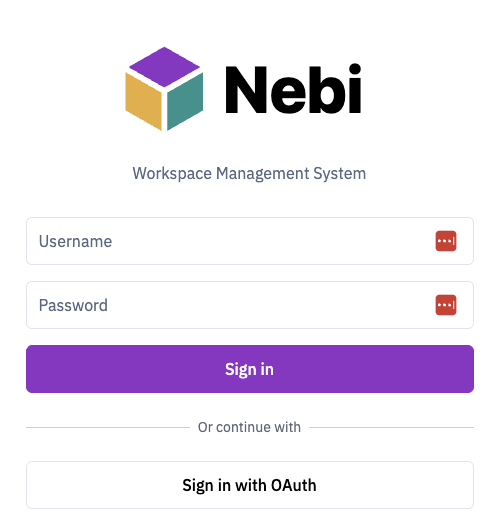
You (and your team) will use these credentials to log in via nebi login or the web UI.
Export the variables in your terminal session before starting the server:
export ADMIN_USERNAME=adminexport ADMIN_PASSWORD=your-passwordRunning the Server
Section titled “Running the Server”Start the server:
nebi serveBy default (--host unset), Nebi binds all interfaces on port 8460 in team mode. Local mode (NEBI_MODE=local) is a single-user, on-device setup, so the server binds only the loopback interface (127.0.0.1) and only accepts requests addressed to a local host/origin. To bind a local-mode server to another interface, set --host (or NEBI_SERVER_HOST) explicitly.
To use a different port:
nebi serve --port 9000To explicitly bind a host/interface, use --host (or NEBI_SERVER_HOST):
nebi serve --host 127.0.0.1 --port 8460Once the server is running, authenticate from any client machine with nebi login.
API Documentation
Section titled “API Documentation”The Swagger API docs are available at http://localhost:8460/docs.
Resource Limits
Section titled “Resource Limits”Nebi applies request, admission, and job-runtime limits from the limits: config section. Each value can also be overridden with the matching NEBI_LIMITS_* environment variable, for example NEBI_LIMITS_REQUEST_BODY_BYTES, NEBI_LIMITS_ACTIVE_JOBS_PER_USER, or NEBI_LIMITS_JOB_TIMEOUT_SECONDS.
Set a numeric limit to 0 to disable that specific guard. Delete jobs are exempt from active-job quotas so users can still remove a workspace even when pending or running jobs have saturated its quota.
The main job limits are:
request_body_bytes: maximum HTTP request body size.manifest_bytes,lock_bytes,metadata_bytes: maximum stored manifest, lockfile, and metadata sizes.package_string_bytes: package-name size cap.active_jobs_per_user,active_jobs_per_workspace,active_jobs_global: admission quotas for pending/running jobs.job_timeout_seconds: wall-clock deadline for each job.job_cpu_seconds: CPU-time budget enforced withulimit -ton Unix.job_storage_bytes: workspace storage budget checked during and after jobs.job_log_bytes: persisted log cap per job.
CPU/file-size setup is fail-closed: if a configured ulimit budget cannot be applied, the child command exits with code 125 and Nebi fails the job rather than running unbounded. Storage checks are also fail-closed if the workspace cannot be walked.
Per-job memory and process-count limits are intentionally left to deployment isolation for now. In Kubernetes or Docker deployments, set worker pod/container memory and process limits until Nebi jobs run in isolated execution units.
The HTTP server read timeout is configured separately as server.read_timeout_seconds or NEBI_SERVER_READ_TIMEOUT_SECONDS. If omitted, Nebi derives it from limits.request_body_bytes; set it to 0 to disable.
Groups
Section titled “Groups”OIDC group sync
Section titled “OIDC group sync”When OIDC authentication is configured, nebi requests the groups scope alongside openid profile email. The IdP must return a groups claim in the ID token (a JSON array of strings). On every login and proxy/device session refresh, nebi reconciles the user’s group memberships:
- For each name in the claim, an OIDC-source group is created (if missing) and the user is added to it.
- Memberships in OIDC-source groups that aren’t in this login’s claim are removed.
- Native groups (created via the admin UI) are never modified by OIDC sync — even if a claim name happens to collide with a native group name.
OIDC groups with zero members are kept so existing workspace shares survive temporary churn. Reconciled bearer sessions carry an authorization-sync timestamp and are accepted for NEBI_AUTH_AUTHORIZATION_STALE_AFTER_MINS minutes, which defaults to the 24-hour JWT lifetime; legacy unstamped tokens keep the pre-schema JWT-expiration behavior. Nebi records the last trusted authorization state, continuously retries unresolved local database/Casbin reconciliation failures, and logs alerts when reconciliation is unhealthy.
Legacy federated identity migration
Section titled “Legacy federated identity migration”Nebi versions that predate issuer/subject identity binding may have users created by OIDC, proxy auth, or device flow with no row in federated_identities. Nebi now treats the first post-upgrade login for those users like any other external-identity collision when the incoming username or verified email still matches an existing account: it creates a pending Identity Review for an admin to approve.
After upgrading, expect a temporary burst of identity reviews as legacy users sign in. Approving a review binds that external issuer/subject to the existing Nebi account and audit-logs the decision. Rejecting a review blocks that external identity from linking to the account; admins can later discard the rejected review from the Rejected tab to allow a fresh review on the next login.
If a user’s mutable IdP claims changed before their first post-upgrade login and no longer collide with the legacy account, Nebi cannot infer the old account binding automatically. That login is treated as a new issuer/subject and creates a new Nebi account with its own binding.
See Identity Reviews for how to review and approve these requests.
What’s Next
Section titled “What’s Next”- See the CLI Team Workflows for push/pull examples
- Check the CLI Reference for all available commands